Sentry

By Sentry

4.5 out of 5 stars

How would you rate your experience with Sentry?

Compare this with other toolsSave it to your board and evaluate your options side by side.
Save to board

Sentry Reviews & Product Details

Pricing

Pricing provided by Sentry.

Developer

Free

Sentry Media

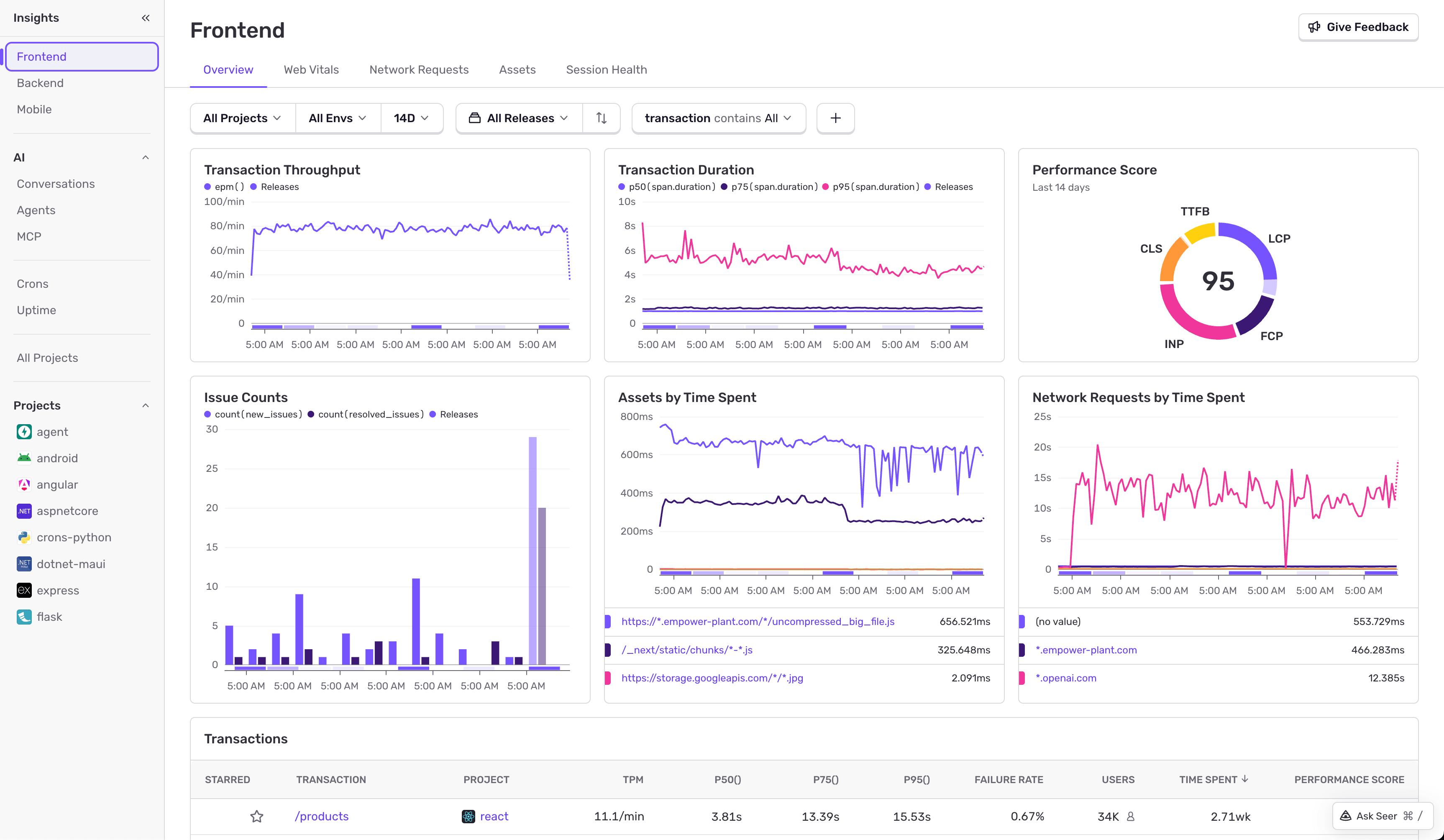
Sentry Demo - Application Performance Monitoring
Performance gives you the details you need to not only prioritize critical performance issues, but to trace issues down to the root cause to solve them faster.
Sentry Demo - Session Replay
Get to the root cause of an issue faster by watching replays of real user sessions with best-in-class privacy controls. Understand when, where, and how an error is impacting your website or mobile app without having to repro it yourself, talk to a customer, or expose sensitive data.
Sentry Demo - AI and LLM Observability
Agents, LLMs, vector stores, custom logic—visibility can’t stop at the model call. Get the context you need to debug failures, optimize performance, and keep AI features reliable.
Sentry Demo - Structured Logs
Logs are most useful when they’re connected to what you're debugging — issues, traces, and the code itself. Sentry brings logs into the same view as errors and performance, so you can see what happened and why, without switching tools or losing context.
Sentry Demo - AI Debugging
Seer is the AI debugger that uses Sentry context – like errors, traces, logs, replays, and commit history– to flag breaking changes, automatically root cause issues in production, and fix what you missed.
Seer - Sentry's AI Debugging Agent
Play Sentry Video
Seer - Sentry's AI Debugging Agent
How to Monitor Critical Experiences with Sentry
Play Sentry Video
How to Monitor Critical Experiences with Sentry
[Workshop] Fixing Your Frontend: Performance Monitoring
Play Sentry Video
[Workshop] Fixing Your Frontend: Performance Monitoring
Debugging Next.js Applications with Sentry
Play Sentry Video
Debugging Next.js Applications with Sentry
Product Avatar Image

Have you used Sentry before?

Answer a few questions to help the Sentry community

Sentry Reviews (237)

View 1 Video Reviews
Reviews

Sentry Reviews (237)

View 1 Video Reviews
4.5
237 reviews

Review Summary

Generated using AI from real user reviews
Users consistently praise Sentry for its ease of use and detailed error tracking, which significantly enhances their debugging processes. The platform's ability to provide actionable insights and real-time notifications allows developers to address issues proactively, often before customers notice them. However, some users note that the interface can feel overwhelming for newcomers.

Pros & Cons

Generated from real user reviews
View All Pros and Cons
Search reviews
Filter Reviews
Clear Results
G2 reviews are authentic and verified.
Rizwan k.
RK
Chief Executive Officer
Small-Business (50 or fewer emp.)
"Mission-Critical Observability with Actionable Context, Replays, and Strong Integrations"
What do you like best about Sentry?

What I Like Best About Sentry

Sentry has evolved from a “nice-to-have” error logger into a mission-critical observability platform. What stands out most to me is how its core features consistently turn vague reports into clear, actionable next steps.

Actionable Context (UI/UX & AI)

Issue Grouping and Breadcrumbs are easily the most valuable features. Rather than dumping a raw stack trace, Sentry gives a visual timeline of what the user did right before a crash—clicks, navigation, console logs, and other key signals.

The benefit is that it breaks the endless “cannot reproduce” loop. On top of that, the AI-assisted root cause analysis now points to the commit or specific line of code that likely introduced a regression, which can turn hours of debugging into minutes.

Seamless Workflow (Integrations)

The GitHub and Slack integrations feel essential. Being able to assign an issue to a developer or connect it to a Jira ticket directly from the Sentry UI helps the team stay in a flow state instead of bouncing between tools. The “Suspect Commits” feature also automatically flags the likely author of the change, which streamlines accountability without the usual manual hunting.

Performance Monitoring & Session Replay

Sentry goes well beyond “errors.” Session Replay, in particular, provides an unexpected level of insight: seeing exactly how a user experienced lag or a UI glitch adds a kind of empathy for the real user experience that standard logs just can’t match.

On the performance side, Distributed Tracing helps us understand how a frontend slowdown may actually be driven by a specific slow backend API call, which bridges the gap between client and server teams.

ROI and Scalability

From a pricing/ROI perspective, “Spend Protection” and sample-rate controls are excellent. They help ensure that a sudden error spike doesn’t turn into a massive, unexpected bill, keeping costs predictable as we scale.

Support and Onboarding

Onboarding is remarkably smooth. With just a few lines of code for SDK initialization, you can start getting deep insights immediately. The documentation is developer-centric—clear, practical, and focused on quick implementation. Review collected by and hosted on G2.com.

What do you dislike about Sentry?

While Sentry is a powerhouse for error tracking, it still has a few friction points that can be frustrating for power users and growing teams.

First, alert noise and configuration fatigue are real risks. The sheer volume of data Sentry captures is a double-edged sword: if you don’t dial things in early, alert fatigue can set in fast. The default alerting rules can be overly sensitive and end up flooding Slack or email with “noise.” Getting those rules tuned so they reliably separate a critical system failure from a minor, handled UI exception takes a meaningful time investment, and the path to doing it well isn’t always intuitive.

Second, the UI has become increasingly complex as Sentry has expanded beyond error logging into Performance, Replays, and Crons. The dashboard can feel dense, and finding specific settings—or even just moving between “Discover” queries and “Issue” views—can be overwhelming for new team members. There’s also a steep learning curve to mastering the query language (Sentry Structured Queries) so you can consistently pull exactly the data you’re looking for.

Third, data volume and quota management can be a headache, especially around data truncation and sampling. To keep costs down, you often end up implementing aggressive sampling (for example, only keeping 10% of performance traces). The downside is that the one trace you need to debug a rare edge case sometimes isn’t there because it fell outside the sample rate. Balancing visibility with budget can turn into constant monitoring of “dropped events.”

Fourth, the SDK footprint can feel heavy. The SDKs are “plug-and-play,” but they aren’t invisible. In performance-sensitive frontend applications, enabling multiple Sentry features (like Session Replay and heavier breadcrumb tracking) can noticeably increase bundle size. If you’re optimizing for “Lighthouse” scores and millisecond-level performance, the trade-off between observability and site speed becomes an ongoing debate.

Finally, pricing jumps between tiers can be tough. The entry-level pricing feels fair, but moving up to “Business” or “Enterprise” can feel steep. Some advanced features—like certain SSO integrations or longer data retention—are locked behind higher-cost tiers, which can be a hard sell for mid-sized startups that need those security features but aren’t yet operating at “Enterprise” levels of data. Review collected by and hosted on G2.com.

Amey S.
AS
Senior Technical Consultant • Software Engineering
Small-Business (50 or fewer emp.)
"Less Guessing, More Fixing"
What do you like best about Sentry?

UI / UX

The interface took me a little while to get used to, but once I did, it felt pretty intuitive. The issue dashboard is well-organized and grouping similar errors together saves a ton of time. I especially like how clicking into an error gives you everything in one place — stack trace, breadcrumbs, user context — without jumping between tabs.

Integrations

This is where Sentry really shines for me. It plugged into my GitHub and Slack setup without any hassle. The GitHub integration is particularly useful — it links errors directly to commits and even suggests which code change likely caused the issue. That alone has saved me hours. Review collected by and hosted on G2.com.

What do you dislike about Sentry?

Pricing / ROI

Honestly, the free tier starts feeling limiting pretty quickly once your project grows. The event quota runs out faster than I expected, and when it does, you either start losing error data or you're forced to upgrade. The jump in pricing between tiers felt a bit steep for an indie developer or a small team watching their budget. I also wish the quota system was a bit more transparent — it took me some time to fully understand what counts as an "event" and how fast I'd burn through my allowance. That said, if you're at a company with a proper engineering budget, it's probably not a dealbreaker. Review collected by and hosted on G2.com.

Shelby S.
SS
Staff Software Engineer
Small-Business (50 or fewer emp.)
"Polished, Powerful, and Intuitive - Fast, Great Value, Easy Onboarding"
What do you like best about Sentry?

Polished tool - You can tell the folks behind this tool care about their product as it is overwhelmingly powerful yet feels pretty intuitive to navigate and get what you want out of it.

Search console - Searching for what you want is really fast for the amount of data its stitching together.

Incremental adoption / onboarding - Start by installing Sentry into a product and add additional features (logs, profiling, metrics) as you need them.

Integrations - Ticket tool integration is really impressive and intuitive

Pricing - Really fair for the value you can receive from the tool. Review collected by and hosted on G2.com.

What do you dislike about Sentry?

Honestly nothing at this point - Sentry continues to exceed expectations. Review collected by and hosted on G2.com.

Sanjar A.
SA
Technical Lead
Small-Business (50 or fewer emp.)
"Essential for Error Tracking and Product Stability"
What do you like best about Sentry?

I find Sentry very helpful for tracing issues, viewing stack traces, and understanding errors. Its customizable alerts, environments, releases, and integrations make it adaptable to our needs. I like most error tracking and release tracking, as they help us quickly know when something breaks in production before users report issues and see which release introduced an error. The UI is clear, making navigation easy. Setting up Sentry is straightforward, with easy-to-understand configuration and SDK integration that didn't take long. Review collected by and hosted on G2.com.

What do you dislike about Sentry?

One issue I experienced was related to email notifications. After I stopped work with a company and my account was removed from Azure Active Directory, I still received Sentry error notification emails from that organization. Since I could no longer log in through Azure AD, I couldn't unsubscribe from those emails. It would be helpful if users could manage email subscriptions without needing organization login access. Review collected by and hosted on G2.com.

Oscar G.
OG
Software Engineer
Small-Business (50 or fewer emp.)
"Full Visibility Into App Issues With an Intuitive, Powerful Sentry UI"
What do you like best about Sentry?

Sentry gives me the full picture of what's happening in my app at any given time. The UI makes it easy to navigate — error grouping, stack traces, and breadcrumbs are laid out in a way that actually makes sense. When something breaks, I'm not left guessing: it pinpoints exactly where things went wrong and why, down to the specific line of code.

The integration with Next.js and our CI/CD pipeline was straightforward, and performance monitoring has helped us catch bottlenecks we wouldn't have noticed otherwise. The AI-assisted issue triage is a nice touch too — it helps prioritize what actually needs attention. It's the kind of tool that makes you wonder how you ever shipped software without it. Review collected by and hosted on G2.com.

What do you dislike about Sentry?

The initial setup and configuration can take some time to get right, especially when fine-tuning alert thresholds to avoid noise. Review collected by and hosted on G2.com.

Kushal G.
KG
SDE-1
Small-Business (50 or fewer emp.)
"Sentry Makes Error Fixing Fast with Clear Timelines, Replays, and Stack Traces"
What do you like best about Sentry?

Sentry has become the industry standard for error tracking because it shifts the focus from "something is wrong" to "here is exactly how to fix it."

The "magic" of Sentry lies in its ability to provide a timeline of events leading up to a crash. It captures:

Breadcrumbs: A trail of user actions (clicks, navigation, API calls) that occurred right before the error.

Session Replay: A video-like reproduction of the user's screen, allowing you to see exactly what they saw without asking them for a screenshot.

Stack Traces: Direct links to the specific line of code in your GitHub or GitLab repository that caused the failure Review collected by and hosted on G2.com.

What do you dislike about Sentry?

Duplicate Issues: Sometimes slight variations in a stack trace (like different line numbers in different versions) cause Sentry to treat the same bug as two separate issues, leading to duplicate notifications. Review collected by and hosted on G2.com.

Arpit A.
AA
Software Developer
Information Technology and Services
Small-Business (50 or fewer emp.)
"Clear, Actionable Error Tracking with Powerful Debugging and Integrations"
What do you like best about Sentry?

Clear, actionable error tracking

Instead of dumping raw logs, Sentry groups similar errors, shows stack traces, and highlights the root cause—so you’re not digging through noise.

Great developer experience

The UI is clean and intuitive, and the setup for most frameworks (JavaScript, Python, etc.) is straightforward. You can get useful insights with minimal configuration.

Real-time alerts that actually matter

It notifies you when something breaks, but with smart grouping so you don’t get spammed with duplicate alerts.

Powerful context & debugging tools

You get breadcrumbs, user sessions, request data, and environment info—basically a replay of what led to the error.

Performance monitoring + tracing

Beyond crashes, it helps track slow transactions and bottlenecks, which is huge for improving user experience.

Integrations that fit dev workflows

Works well with tools like GitHub, Slack, Jira, etc., so issues flow naturally into your existing process. Review collected by and hosted on G2.com.

What do you dislike about Sentry?

Self-hosting is not trivial

While it’s open-source, running your own instance of Sentry reliably at scale requires significant infrastructure and maintenance effort. Review collected by and hosted on G2.com.

Abimael M.
AM
Software Engineer
Information Technology and Services
Small-Business (50 or fewer emp.)
"Sentry Integrates Effortlessly Across React, Node, and Rust"
What do you like best about Sentry?

I really enjoy Sentry's ease of integration, i've worked on a lot different codebases, and Sentry is always very easy to integrate regardless of the architecture.

Recently, i integrated Sentry on a pretty distributed app architecture, and we were able to get traces from React, Node and Rust, and using trace continuation across Typescript, TSX and Rust.

I also use Sentry's notifications on Slack, so i can follow specific labels, for errors on the modules that i'm the owner of. Review collected by and hosted on G2.com.

What do you dislike about Sentry?

I think this is user error, but it's very easy to get a noisy Sentry if not configured correctly.

When integration you need mainly uncaught exceptions are logged into sentry, and any important errors, such a specific integration thats key to your app.

I try to avoid having captureException calls around, and having a good architecture that makes it so actual exceptions, DB errors, Library Errors, etc, do make it to the top level. Review collected by and hosted on G2.com.

Saurabh Y.
SY
Software Developer
Small-Business (50 or fewer emp.)
"Sentry Saves Dev Time with Clear, Actionable Error Details"
What do you like best about Sentry?

Sentry is really helpful for developers it shows when something go wrong in app righ away. Instead of guessing ,you get details about errors and this help to fixing the errors.overall it save time and make apps more reliable. Review collected by and hosted on G2.com.

What do you dislike about Sentry?

There are a lot of things going on, and it can feel confusing until you get used to it. Sometimes it sends too many alerts, which can be frustrating, and it’s also a bit expensive. Review collected by and hosted on G2.com.

Dipanshu S.
DS
Associate Security Consultant
Mid-Market (51-1000 emp.)
"Error Tracking Made Effortless with Sentry"
What do you like best about Sentry?

I've been using Sentry for a while, and it's one of those tools you truly appreciate when something breaks in production at 2am. The error tracking is the best part. It provides the full picture with stack trace, the exact line, what the user was doing, and what triggered it—no need to dig through logs or guess. Sentry solves the 'I had no idea that was broken' problem by silently catching errors in production that users never reported. It greatly reduces my debugging time because it provides all the context needed. I also like the release tracking feature; Sentry tags errors to the release automatically, so if something breaks, you know exactly which deploy caused it. Plus, the Slack integration is really useful—it drops new issues or spikes directly into channels. Review collected by and hosted on G2.com.

What do you dislike about Sentry?

The noise on initial setup is rough. Out of the box, it captures everything, including all the errors you don't actually care about. You spend a decent amount of time tuning filters and ignoring junk before it becomes genuinely useful. An opinionated setup wizard would help a lot. Review collected by and hosted on G2.com.

Questions about Sentry? Ask real users or explore answers from the community

Get practical answers, real workflows, and honest pros and cons from the G2 community or share your insights.

Verified User
G2
Verified User
Last activity about 1 month ago

Is Sentry good for observability?

Verified User
G2
Verified User
Last activity 14 days ago

Does Sentry support distributed tracing?

Pricing Options

Pricing provided by Sentry.

Developer

Free

Team

$26.00

Business

$80.00
Sentry Comparisons
Product Avatar Image
BugSnag
Compare Now
Product Avatar Image
Elasticsearch
Compare Now
Product Avatar Image
Crashlytics
Compare Now
Sentry Features
Real User Monitoring (RUM)
User Reports & Feedback
Tester Reports & Feedback
Team Reports & Comments
Analytics
Bug History
Data Retention
Alerts and Notifications
Product Avatar Image
Sentry